
NFC stickers

Take a break and read all about it

Are NFC Stickers Waterproof and Durable? What Buyers Should Know
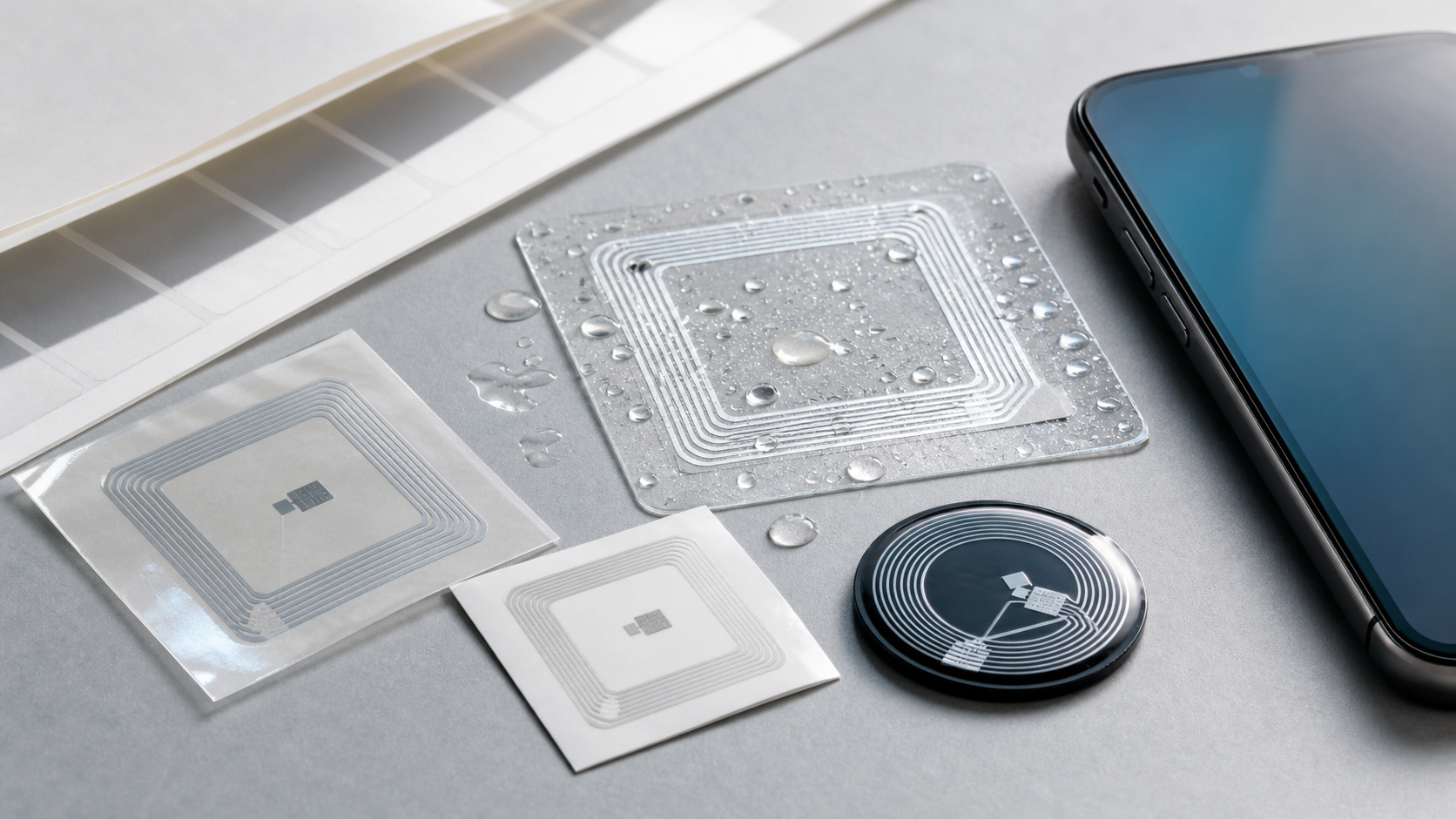
Waterproof NFC stickers, PET labels, epoxy NFC tags, and a smartphone used for tap testing

Quick answer: NFC stickers can be waterproof and durable, but only when the sticker is built for that environment. A basic paper NFC sticker is usually fine for dry indoor campaigns. A PET or PVC NFC label with a protective surface is better for splashes, packaging, and light outdoor use. For repeated washing, chemicals, abrasion, or long-term outdoor exposure, buyers should compare epoxy NFC tags, anti-metal NFC stickers, or purpose-built waterproof RFID tags instead of assuming every NFC sticker is the same.

The NFC chip is rarely the only thing that decides durability. The real weak points are the face material, antenna protection, edge sealing, adhesive, printing surface, and mounting surface. That is why two NFC stickers with the same NTAG213 chip can perform very differently after rain, cleaning, or rough handling.

Waterproof vs Durable: They Are Not The Same Requirement

“Waterproof” describes how well the tag resists water ingress. “Durable” is broader. It includes scratch resistance, UV exposure, heat, cold, bending, chemicals, adhesive strength, and whether the tag still reads after weeks or months in service.

For NFC stickers, the buyer should separate three questions:

  • Will water reach the inlay or chip?
  • Will the adhesive stay bonded to the surface?
  • Will the sticker remain readable and presentable after handling, cleaning, or outdoor exposure?

A sticker can resist splashes but still peel from a curved plastic bottle. Another tag may survive water but become unreadable on metal because it lacks a ferrite isolation layer. Good NFC sticker selection starts with the real environment, not only with the word “waterproof” in a product listing.

NFC Sticker Material Comparison

NFC sticker type Best use case Water resistance Durability tradeoff
Paper NFC sticker Dry indoor posters, short campaigns, giveaways Low unless laminated Lowest cost, but weak against moisture and abrasion
PET or PVC NFC sticker Product packaging, smart labels, retail, light outdoor use Good when protected and correctly applied More durable than paper, but adhesive and edge sealing still matter
Epoxy NFC tag Key tags, equipment labels, wet handling, reusable items Very good because the top surface is sealed Thicker and more visible than a flat label
Anti-metal NFC sticker Metal tools, equipment, shelves, cabinets, devices Depends on surface and construction Needs a ferrite layer; usually thicker and more expensive
Hard-shell waterproof RFID tag Outdoor assets, industrial use, harsh environments Best for heavy-duty exposure Less sticker-like, but more reliable for demanding projects

For many smart packaging and marketing projects, a custom PET or PVC NFC tag is enough. For wet assets, cleaning environments, or outdoor installations, a buyer should also inspect WXR’s waterproof RFID tags and compare whether a sticker format is still the right choice.

What Actually Makes An NFC Sticker Waterproof?

Water resistance comes from the whole construction, not from the chip alone. The face material should be water-resistant, the printed surface should be protected, and the inlay should not be exposed through weak edges or damage. PET, PVC, and similar synthetic materials usually handle moisture better than paper.

The adhesive is just as important. Glass, painted metal, rough plastic, coated paper, and curved packaging all behave differently. Humidity, dust, oil, low temperature, and cleaning chemicals can weaken the bond even when the sticker face looks fine.

When A Standard NFC Sticker Is Enough

A standard NFC sticker is usually enough for dry indoor uses where the tag is not frequently rubbed, washed, or exposed to sunlight. Examples include posters, brochures, shelf labels, product authentication cards, business cards, and short-term promotions.

For these projects, buyers should focus on phone compatibility, chip memory, print quality, adhesive, and whether the sticker will be locked after encoding. Common chip options such as NTAG213, NTAG215, and NTAG216 are often selected based on memory needs, not waterproof performance.

NFC itself is a short-range 13.56 MHz tap technology, so the reader experience also depends on where the user taps the phone. A durable sticker still needs a clear tap location and a surface that does not block the antenna.

When To Upgrade To Waterproof Or Anti-Metal NFC Stickers

Choose a waterproof NFC sticker when the tag may face rain, condensation, wet hands, bathroom or kitchen use, beverage packaging, outdoor signs, or frequent cleaning. In these cases, ask for PET or PVC construction, protective lamination, suitable adhesive, and sample testing on the actual product surface.

Choose an anti-metal NFC sticker when the tag will be applied to metal. Standard NFC stickers often perform poorly on metal because the surface detunes the antenna. An anti-metal RFID tag or NFC sticker uses an isolation layer to help the tag read correctly, but it may be thicker than a normal label.

Choose epoxy or hard-shell tags when the project needs a more sealed, reusable, or impact-resistant format. These may not look like thin stickers, but they can be the better procurement choice for tools, equipment, access items, and wet handling.

Buyer Checklist Before Ordering

Before ordering custom NFC stickers, send the supplier more than a size and chip name. A good specification should include:

  • Application: marketing, packaging, access, asset ID, authentication, or service workflow.
  • Surface: glass, plastic, metal, paperboard, fabric, or curved packaging.
  • Environment: indoor, outdoor, wet, washable, chemical exposure, heat, cold, or UV.
  • NFC chip and memory: NTAG213, NTAG215, NTAG216, MIFARE, or another required chip.
  • Construction: paper, PET, PVC, epoxy, anti-metal, or hard-shell format.
  • Printing and encoding: logo, UID, QR code, URL, vCard, product page, or locked NDEF data.

WXR can customize RFID stickers and label tags by material, chip, shape, printing, encoding, and application needs. For wet or outdoor projects, sample testing is more useful than relying on a generic product description.

How To Test NFC Sticker Durability Before Mass Production

Apply samples to the real surface, not a clean test card. Let the adhesive settle according to the supplier’s guidance, then test tap performance with both iPhone and Android phones from the expected user position.

Expose the sticker to the real stress: water spray, short soaking, condensation, cleaning wipes, sunlight, cold storage, bending, or abrasion. After each test, check whether the edge lifted, whether the printed surface changed, and whether the NFC read still works from a natural tap angle.

FAQ

Do NFC stickers stop working if they get wet?

Not always. A properly sealed waterproof NFC sticker can keep working after water exposure. A basic paper sticker or poorly sealed label may fail because water reaches the inlay or weakens the adhesive.

Are epoxy NFC tags better than PVC NFC stickers?

Epoxy NFC tags are usually better for scratch resistance, wet handling, and a more sealed surface. PVC or PET NFC stickers are thinner and easier to apply on packaging or printed materials. The better option depends on the surface, appearance, budget, and expected lifetime.

Can NFC stickers be used on metal?

Standard NFC stickers are not recommended for metal surfaces. Use an anti-metal NFC sticker or anti-metal RFID tag so the antenna can work correctly near metal.

Which NFC sticker is best for outdoor use?

For light outdoor use, a PET or PVC NFC sticker with suitable adhesive and lamination may be enough. For long-term rain, sun, abrasion, or industrial exposure, compare epoxy, hard-shell, or waterproof RFID tag formats and test samples before mass production.

Conclusion

NFC stickers are waterproof and durable only when the construction matches the use case. For dry indoor campaigns, a simple NFC label may be enough. For water, outdoor exposure, cleaning, or metal surfaces, buyers should compare material, adhesive, sealing, and anti-metal design before choosing.

Need NFC stickers for smart packaging, wet environments, or outdoor assets? Contact WXR with your application, surface, chip requirement, printing design, quantity, and testing environment. The team can help compare NFC sticker, epoxy tag, anti-metal tag, and waterproof RFID tag options before you place a mass order.

Small NFC Tags: Use Cases, Benefits, and Limits

Small NFC tags are useful when you need a simple phone tap interaction in a limited space. They can be built as round stickers, square labels, tiny wet inlays, epoxy tags, cards, key fobs, or custom shapes for product packaging, access control, membership, authentication, and marketing.

The short answer: small NFC tags are best for close-range, one-at-a-time interactions such as opening a product page, verifying an item, sharing contact details, launching an app flow, or identifying a compact asset. They are not the right choice for long-range bulk inventory, large data storage, or difficult surfaces unless the tag design is tested carefully.

What Counts as a Small NFC Tag?

An NFC tag is a passive 13.56 MHz RFID tag that can communicate with an NFC-enabled phone or reader at close range. The tag has a chip and antenna, but no battery. When a phone comes near the tag, the reader field powers the chip and reads the stored data.

"Small" usually refers to the physical format: a compact sticker, label, inlay, coin tag, on-metal mini tag, or embedded tag that must fit on a small product, tool, package, bottle cap, card, accessory, or device housing. WXR supplies custom NFC tags, RFID stickers, and small RFID tags for projects where tag size, material, printing, chip selection, and encoding all matter.

The key tradeoff is antenna area. A smaller antenna can make the tag easier to hide or fit, but it may reduce read distance and make placement more sensitive.

Best Use Cases for Small NFC Tags

Small NFC tags work best when the user can intentionally tap or hold a phone near the tag. Common use cases include:

Use case Why small NFC tags fit What to confirm
Smart packaging Adds product information, manuals, warranty registration, or reorder pages without a large label Sticker material, phone tap location, URL encoding, and anti-tamper needs
Product authentication Helps users check a product ID or open a verification page UID strategy, security level, locking, and backend workflow
Digital business cards Stores a contact page, profile, or lead capture link in a thin card or sticker Chip memory, design printing, phone compatibility
Events and membership Supports tap-to-check-in, coupons, loyalty pages, or member ID Expected scan volume, tag durability, and whether cards or wristbands are better
Tools and compact assets Marks small items that cannot carry a large RFID label Surface material, read position, and whether NFC or UHF is the better frequency
Access and device triggers Opens a controlled app action, Wi-Fi setup, or maintenance record Reader system, chip compatibility, and permission model

For projects where users tap with phones, NFC is usually more natural than UHF RFID. For warehouse inventory where many items must be read at a distance, UHF may be more suitable. WXR's guide on NFC vs RFID is a useful next read when the application is not yet fixed.

Benefits of Small NFC Tags

The biggest benefit is low-friction interaction. A printed package, card, poster, label, or product can become digital without a visible battery, screen, or large device. Users tap and reach the intended page or action.

Small NFC tags are also easy to customize. Buyers can choose chip type, tag diameter, adhesive, waterproof material, anti-metal layer, epoxy finish, printed logo, serial number, QR code, and pre-encoded URL or NDEF message.

For B2B projects, the practical value is control. Instead of printing one static QR code for every product, a brand can encode different URLs, serials, or IDs by batch, SKU, region, or campaign. NFC also reduces scanning friction in situations where a phone tap feels more premium than camera scanning.

Another benefit is compatibility with common NFC phones, especially for simple NDEF records such as URLs, contact links, app links, and short IDs. The NFC Forum maintains specifications that support interoperability across contactless modes, including reader/writer behavior.

Limits You Should Test Before Ordering

Small NFC tags have real limits. The first is read range. NFC is designed for close interaction, and small antennas often require very close placement. Do not select the smallest possible tag until you test it on the real product with the real phone or reader.

The second limit is surface material. Metal can detune a standard NFC sticker and make it unreadable or unstable. Liquids, carbon fiber, dense electronics, curved surfaces, and thick packaging can also affect performance. If the tag will be placed on metal, ask for an anti-metal NFC tag or ferrite-backed structure.

The third limit is memory. NTAG213, NTAG215, and NTAG216 are common NFC chip options with different user memory sizes. WXR's NTAG213 vs NTAG215 vs NTAG216 guide compares common choices. In many projects, NTAG213 is enough for a short URL; NTAG215 or NTAG216 may be better for longer NDEF messages, vCards, or more complex records.

The fourth limit is security. A basic NFC tag is not a full anti-counterfeiting system by itself. If the tag only stores a public URL, someone may copy the link. For authentication, discuss UID usage, password protection, read-only locking, dynamic URLs, tamper-evident labels, or higher-security chip options.

The fifth limit is environment. Adhesive strength, waterproofing, heat, abrasion, cleaning, bending, and UV exposure all depend on material. A tiny paper NFC sticker may be fine for indoor packaging, but not for tools, outdoor products, or washable items.

How to Choose the Right Small NFC Tag

Start with the interaction. Will the user tap with a phone, or will a fixed reader scan the tag? If the project depends on smartphone interaction, choose a phone-compatible 13.56 MHz NFC format. If the project needs long-distance inventory, compare UHF RFID before deciding.

Next, define the mounting surface. For paper, plastic, and cardboard, a standard NFC sticker or wet inlay may work. For metal, choose an anti-metal NFC design. For premium goods, an epoxy tag or custom printed label may protect the antenna and improve appearance.

Then choose the chip and encoding plan. Short URLs usually need less memory. Contact cards, multi-field NDEF messages, or app workflows may need more. Decide whether the data should remain rewritable during testing and locked before shipment.

Finally, test samples. Send WXR your product material, tag size target, read distance expectation, phone models or reader model, environment, printing needs, encoding format, and quantity. The safest procurement process is sample testing before mass production.

Small NFC Tag Testing Checklist

Before rollout, test:

  • The smallest acceptable tag size on the real product surface.
  • Tap position with both iPhone and Android devices if consumers will scan the tag.
  • Read reliability before and after printing, lamination, packaging, or assembly.
  • Performance near metal, liquid, electronics, or curved surfaces.
  • Adhesive, waterproofing, abrasion resistance, and temperature exposure.
  • Encoding, URL redirects, analytics, locking, and backup process.

FAQ

Do small NFC tags work with all smartphones?

Most modern NFC-enabled smartphones can read common NFC tags, but performance depends on phone model, antenna position, tag chip, tag size, and placement. Always test with the phone models your users are likely to use.

Can small NFC tags store a full product page or file?

Usually no. NFC tags store small data records, not large files. A common approach is to encode a short URL that opens a product page, manual, warranty form, or authentication result online.

Do small NFC tags work on metal?

Standard NFC stickers usually do not perform well on metal. For metal products, tools, devices, or containers, choose an anti-metal NFC tag and test it on the exact surface.

Can WXR customize small NFC tags?

Yes. WXR can help with chip selection, tag size, material, printing, logo, serial number, QR code, encoding, and sample testing for custom NFC projects.

Conclusion

Small NFC tags are a strong choice when space is limited and the user interaction is intentional, close-range, and phone-friendly. The main decision is not simply "which tag is smallest?" but "which small tag still reads reliably on the real product?" If you need NFC stickers, inlays, anti-metal tags, or encoded custom samples, contact WXR with your application details and testing requirements.

How to Program Blank Printable NFC Stickers: 8 Steps

Blank printable NFC stickers can be programmed in minutes: create an NDEF record in a phone app, tap the phone to the sticker to write it, then scan the tag again to verify it. A reliable rollout also requires the right chip, printer, mounting surface, lock state, redirect link, and batch QA. This eight-step process covers the complete deployment.

1. Define What the NFC Sticker Should Do

Start with the user action, not the chip. A sticker can open a product page, manual, registration form, menu, social profile, authentication result, or maintenance record.

For public campaigns, write a short HTTPS redirect URL on a domain you control. You can then change the destination without rewriting deployed stickers and add UTM parameters or unique IDs for analytics. Do not store passwords or private customer data; standard NDEF content may be readable by anyone with a compatible phone.

2. Choose the Right Printable NFC Sticker

Confirm the chip, construction, print method, and mounting surface before buying. According to the NXP NTAG213/215/216 datasheet, these chips provide 144, 504, and 888 bytes of user memory respectively.

OptionPractical fitWhat to confirm
NTAG213Short URLs and common tap-to-open usesURL length, phone compatibility, lock requirements
NTAG215Larger NDEF records or application-specific needsActual data size and software support
NTAG216More memory for larger recordsWhether extra memory is genuinely necessary

Ask whether the face stock is designed for your inkjet, laser, thermal transfer, or digital press. Confirm label size, roll core, gap, liner, adhesive, and sensor requirements. A label described as “printable” is not compatible with every printer.

Standard NFC inlays can perform poorly on metal. Use a ferrite-backed on-metal NFC sticker and test it on the actual object. WXR offers NFC tag formats and adhesive RFID stickers for different applications.

3. Design and Print the Sticker

Add a clear NFC symbol and instruction such as “Tap for product details.” A fallback URL or QR code helps when NFC is disabled or unfamiliar.

Follow the printer’s bleed and die-cut requirements. Do not crease, punch, or cut through the antenna. Metallic foil and conductive inks may change RF performance, so test decorated samples. For variable data, map each printed serial number or QR code to the URL encoded in the same label.

4. Program One Pilot Sticker

NFC phones exchange structured data through NDEF, the NFC Data Exchange Format standardized by the NFC Forum.

Use NFC Tools or another reputable NDEF writer that supports your phone and tag type:

  1. Enable NFC on the phone if the device requires it.
  2. Open the app and choose Write or Create Record.
  3. Select URL/URI and enter your short HTTPS link.
  4. Choose the app’s write command.
  5. Hold the phone’s NFC antenna steadily over the center of the sticker until the app confirms success.
  6. Move the phone away, then scan the tag as a normal user.

If writing fails, move the tag slowly around the back of the phone, remove thick or metallic cases, and try again without bending the label.

5. Verify the User Experience

A successful “write” message is not enough. Confirm the exact URL, secure mobile landing page, and normal tap behavior on several current iPhone and Android models. Apple Core NFC and Android NFC handle NDEF tags through different platform features, and antenna positions vary.

Test again after attaching the sticker to its final package, sign, asset, or fixture. Mounting material and nearby metal can change the result.

6. Encode and QA the Batch

For dozens of identical stickers, repeat the approved NDEF record with a phone. For hundreds or thousands, use controlled printing and encoding with variable URLs, serial numbers, QR codes, and verification results.

Record the batch number, printed ID, encoded URL, UID when required, verification result, lock state, and destination. Use 100% electronic verification for high-value unique links or a documented sampling plan for lower-risk identical records.

7. Decide Whether to Lock the Tag

Many blank NFC stickers remain rewritable until locked. Locking can prevent accidental changes, but it does not turn a basic tag into a secure authentication product. Use permanent read-only mode only after the design, NDEF record, redirect, and placement are approved. Test the irreversible workflow on spare samples first.

8. Deploy, Monitor, and Maintain

Clean and dry the surface, apply the sticker flat, and keep it away from edges that fold or flex. Make the tap point visible and reachable. After installation, rescan a sample and monitor redirect logs, landing-page analytics, and failed destinations. Unique redirects also let you disable one damaged or misused label without changing the full campaign.

Printable NFC Sticker Deployment Checklist

  • Confirm the phone action and final landing page.
  • Select adequate chip memory without overspecifying it.
  • Match the label face stock and roll format to the printer.
  • Use an on-metal construction when the mounting surface requires it.
  • Print a clear tap instruction and optional fallback.
  • Write a short HTTPS URL as an NDEF record.
  • Verify the record on multiple iPhone and Android devices.
  • Test after attachment to the real product or surface.
  • Lock only after final approval.
  • Record batch, encoded data, QA result, and deployment location.

Common Mistakes to Avoid

Common failures include using a standard label on metal, choosing an incompatible printer process, cutting the antenna, locking before verification, and testing only one phone. Run a small pilot under production conditions before applying the full batch.

FAQ

Can I program NFC stickers with an iPhone or Android phone?

Yes, many current NFC-enabled iPhone and Android phones can write compatible NDEF tags through an NFC writer app. Device support and antenna position vary, so verify the exact phones used in your project.

Can I print directly on blank NFC stickers?

Yes, when the label face stock and roll or sheet construction are made for your printing process. Confirm inkjet, laser, thermal transfer, or digital press compatibility with the supplier and printer manufacturer before production.

Should I use NTAG213, NTAG215, or NTAG216?

NTAG213 is often sufficient for a short URL. Choose NTAG215 or NTAG216 when the NDEF record requires more memory or the application specifies those chips. Calculate the actual encoded size before ordering.

Do printable NFC stickers work on metal?

Standard NFC stickers often lose performance on metal. Use an on-metal NFC label with a ferrite isolation layer and test it on the final metal surface.

Conclusion

Programming one NFC sticker is easy; deploying a reliable batch requires controlled printing, encoding, testing, and records. Use a short NDEF URL, verify across phones and final surfaces, and lock only after approval.

Need printable NFC stickers for product information, authentication, or smart packaging? Contact WXR with your chip, size, material, printer, surface, artwork, encoding file, quantity, and test requirements. WXR can help compare NTAG213, NTAG215, NTAG216, waterproof, anti-metal, and custom printed formats.

How to Program NFC Tags

Near Field Communication (Technology) can help you automate tasks and make life easier. It uses programmable NFC tags to communicate with your devices and trigger actions.

You can program an NFC tag to do all sorts of things, like open an app, dial a phone number, or even send a text message. The sky’s the limit!

If you’re not familiar with NFC tags and how they work, check out this guide on how to program NFC tags for iPhone and Android.

What is NFC Tag Programming?

NFC tag programming refers to setting up an NFC tag to perform a desired task. This can be anything from opening an app to calling a phone number or sending a text message.

To program an NFC tag, you will need an NFC-enabled device and an NFC tag. You can purchase pre-programmed NFC tags, or program them yourself using an NFC tag programming tool.

There are a few different ways to program NFC tags. The method you use will depend on the type of device you’re using and the capabilities of the NFC tag. Here is a comprehensive guide:

What You Need to Program NFC Tags 

To program an NFC tag, you’ll need a few things:

  • An NFC-Enabled Smartphone. You can check if your phone has NFC by going into the settings menu and looking for the NFC option.
  • Blank NFC Tags. You can purchase these online or at your local electronics store.
  • An NFC Tag Programming App. Several apps are available, but we recommend NFC Tools or NFC Trigger for Android and iPhone.

Once you have all the necessary items, you’re ready to start programming your own NFC tags!

How to Program NFC Tags for Android 

Before you start, ensure that you download & activate NFC Trigger APK on your Android device (from play store). Once you’re set, follow these guidelines:

  • Enable NFC on Your Android Phone. You can do this by opening the settings menu, selecting Bluetooth and Device Connection, then Connection Preferences, and turning on the NFC option.
  • Open NFC Trigger App. Tap the “+” icon to add a new task. You can then select a trigger/action. In this case, you can tap the Run a Task or Switch a Task when you Tap NFC Tag. You can then click next.
  • Add Restrictions. You can tap on “Add Restrictions” to add conditions to your task. For example, you can set it so that the task only runs when your phone is unlocked or when you’re connected to Wi-Fi. Tap the Done button.
  • Choose an Action. For example, you can choose Bluetooth On/Off option. In this case, we’ll choose Bluetooth On/Off.
  • Configure Your Action. You will then need to configure your action. In this case, you’ll need to choose whether you want the Bluetooth to turn on or off when the NFC tag is tapped. Tap the Done button.
  • Save Your Task. You can then name your task and tap the Save button. Your task will now be saved and ready to use!
  • Write the Tag. You should now place the NFC tag near the rear camera. The app will write the actions to the NFC tag automatically. Ensure that you get a success message as a confirmation that the write was successful.
  • Test Your Task. To test your task, make sure that NFC is enabled on your phone, and then hold your phone close to the NFC tag. If everything is working correctly, the task should be triggered!

If you want to add more actions to your task, you can tap the “+” icon and repeat the steps above. When finished, tap the Save button.

How to Program NFC Tags in iPhones

Before you start the programming process, you should understand that not all iPhones are NFC-compatible. So, how do you know whether your iPhone is NFC-enabled? Here’s a guide:

All recent iPhones (iPhone 6 and later) have NFC chips inside. If you need more details, here is a list of all NFC-enabled iPhone devices (with iOS 13 or newer):

  • iPhone 13, iPhone 13 Pro Max, iPhone 13 Mini, and iPhone 13 Pro
  • iPhone 12, iPhone 12 Pro Max, iPhone 12 Mini, and iPhone 12 Pro
  • iPhone 11, iPhone 11 Pro Max, iPhone SE (second generation), and iPhone 11 Pro
  • iPhone XS, iPhone XS Max, and iPhone XR
  • iPhone X
  • iPhone 8 and 8 Plus
  • iPhone 7 and 7 Plus
  • iPhone 6s & 6s Plus, iPhone 6, and iPhone SE

Now that you know whether your iPhone is NFC-compatible, you can proceed with the programming process. Here’s what you need to do:

Download the NFC Tools app from Apple Store then follow these steps:

  • Open NFC Tools App. Tap on the Write option. You will be requested to create a new record. You can then select the type of record you want to create, including Text, URL, or a Command. In this case, we’ll choose Text.
  • Configure Your Record. You will need to enter the text you want to write to the NFC tag in the “Text” field. When you’re finished, click Save.
  • Write to Tag. You should now place the NFC tag near the rear camera and click the WRITE option. The app will write the actions to the NFC tag automatically. Ensure that you get a success message as a confirmation that the write was successful.
  • Test Your Tag. To test your tag, make sure that NFC is enabled on your phone, and then hold your phone close to the NFC tag.

If you want to add more actions to your tag, you can tap on the “WRITE” icon and repeat the steps above. When done, tap the Save button.

Trigger an iOS Shortcut using a Blank NFC Tag

This is the simplest way to use NFC tags with your iPhone. You can use a blank NFC tag to trigger an iOS shortcut that you’ve already created. Here’s how to do it:

  • Open the Settings app on your iPhone and tap on the Shortcuts option. Tap the Automation tab.
  • Select the “Create Personal Automation” option and select NFC.
  • Tap Scan and place your phone near the NFC Tag. Enter your preferred name and add an action.
  • Customize the action all you want and tap the NEXT button. Select Ask Before Running Off and tap Done

Related Articles

Ask For A Quick Quote

Your inquiry will be replied within 24 hours! Please pay attention to the email with the suffix “@tag-rfid.com”. If not received, please check your spam email.