
RFID Cards

Take a break and read all about it

Blank RFID Cards: What to Specify Before Printing and Encoding

Blank RFID cards are not just plain white cards. For a reliable access, membership, hotel, campus, or payment-related card project, the buyer has to specify the chip, frequency, card material, printing method, encoding data, and sample test plan before mass production. If those details are left vague, the finished card may look acceptable but fail at the reader, print poorly, or arrive with data that does not match the system.

This guide explains what to confirm before ordering custom RFID cards, especially blank PVC cards that will be printed, encoded, or personalized later. Use it as a quote-preparation checklist before you ask a supplier for samples.

What are blank RFID cards?

Blank RFID cards are card bodies with an embedded RFID or NFC chip and antenna, usually supplied without visible artwork. They may be plain white PVC cards, printable cards for card printers, or pre-produced smart cards ready for later logo printing, UID printing, QR codes, serial numbers, or data encoding.

The word “blank” can mean different things. Some buyers mean a completely white printable card. Others mean a non-printed card that is already encoded. Some need a contactless chip card with a magnetic stripe, signature panel, or barcode. Before requesting a quote, define exactly which version you need.
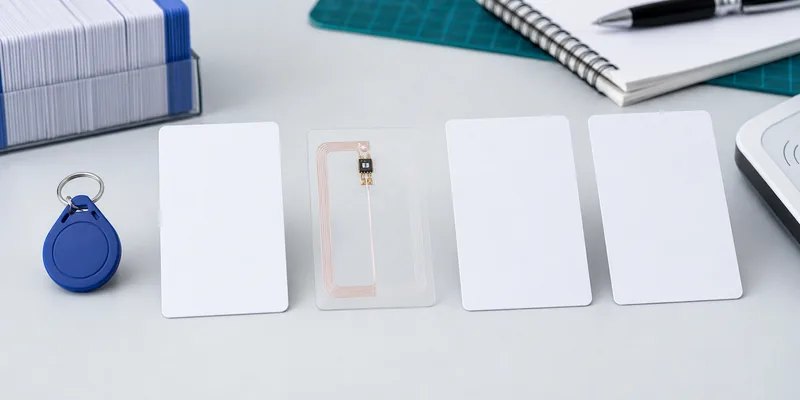
Blank RFID cards with different chip and frequency options for buyer selection
Chip, frequency, and reader compatibility should be confirmed before artwork or encoding is finalized.

Start with the reader system, not the card design

Artwork matters, but compatibility comes first. The reader system determines whether the card should use LF, HF, NFC, or another format. For many access control and hotel projects, buyers already have installed readers, software, and card management rules. In that case, the safest starting point is the chip or card type currently accepted by the system.

If the project is new, confirm the operating frequency before choosing a card. LF 125 kHz RFID cards are commonly used for simple close-range ID applications. HF 13.56 MHz RFID cards and NFC cards are used for many smart card, membership, hotel, and phone-interaction projects. UHF cards exist, but they are less common for normal wallet-style access cards and need more careful reader and orientation testing.

Specify the chip and memory requirements

Do not ask only for an “RFID card” or “NFC card.” That leaves too much room for mismatch. Instead, state the chip family or required protocol when known. For example, a buyer may need MIFARE Classic, MIFARE DESFire, NTAG213, NTAG215, NTAG216, TK4100, EM4100, or another chip type depending on the reader and application.

If you are replacing an existing card, send the supplier the readable chip information, not private system credentials. If your software integrator provides the chip requirement, use that exact name in the purchase request. WXR can help compare card formats, but the final chip choice should match the actual reader and access control software. For chip-selection background, see WXR’s guide on how to choose an RFID MIFARE chip.

Decide how the blank card will be printed

A blank RFID card may be printed by the supplier, printed by the buyer, or kept unprinted for later personalization. Each route has different risks.

Printing route Best fit What to confirm before ordering
Supplier offset or silkscreen printing Brand cards, hotel cards, membership programs, repeat designs Artwork file, color tolerance, surface finish, chip position, sample approval
Digital printing by supplier Short runs, variable serial numbers, QR codes, fast design changes Numbering logic, data file format, print durability, card surface
Inkjet or desktop card printing by buyer In-house personalization and small batches Printer compatibility, printable coating, drying time, smudge resistance, edge coverage
No printing System testing, internal cards, later local printing Chip type, UID format, packaging, card thickness, encoding status

For inkjet PVC cards, the coating matters. A normal glossy PVC card may not accept ink the same way as an inkjet-printable card. If the card will be printed in-house, ask for samples and test the exact printer, ink, drying time, and handling process before approving a bulk order.
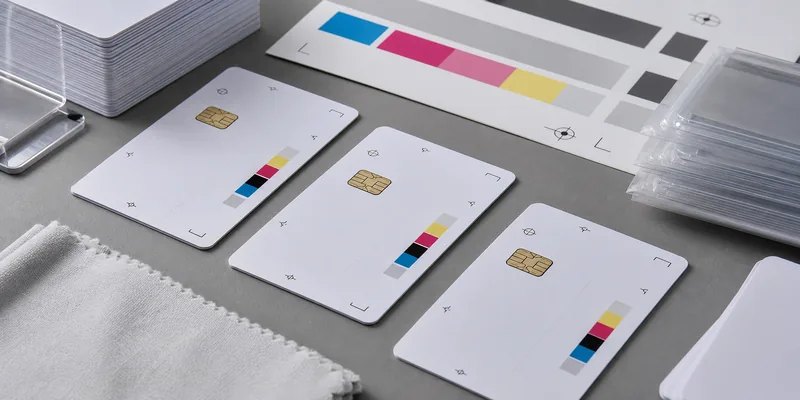
Custom printing tests on blank PVC RFID cards before bulk production
Print tests should check coating, alignment, drying, color tolerance, and card handling before bulk production.

Confirm encoding before production

Many card problems are data problems, not card-body problems. Before mass production, confirm whether the cards should ship blank, UID-only, or pre-encoded with a defined data structure. If WXR or another supplier will encode cards before shipment, provide a clear encoding file and explain which fields are fixed, variable, locked, or left writable.

For NFC cards, confirm whether the card needs an NDEF URL, vCard, app link, or another record. For access cards, confirm whether the system uses UID, sector data, encrypted keys, facility codes, card numbers, or a separate enrollment process. Do not share secret keys in a general purchase email; coordinate sensitive system credentials through the integrator’s approved process.

Check card body details that affect daily use

Most blank RFID cards look similar in a product photo, but small body details can change user experience and durability. Confirm the card size, thickness, corner radius, surface finish, chip position, antenna layout, and whether extra features such as a magnetic stripe, signature panel, barcode, QR code, punched slot, or matte surface are needed.

Standard card thickness is often chosen for compatibility with wallets and card printers, but do not assume it without confirming. If the card will be used in a lanyard, check whether a slot punch could damage the antenna. If it will be used near a phone case, metal holder, or reader with a tight enclosure, test the real use condition before approving final production.

Use a sample test plan before bulk orders

Samples should answer practical questions, not only prove that a card can be read once. Test the card with the actual reader, software, printer, artwork, encoding format, and user workflow. A good sample test includes:

  • Reader compatibility on every reader model used in the project
  • Read position and read speed in the normal user workflow
  • Encoding verification with the target software or enrollment process
  • Print alignment, color, drying, and scratch checks after handling
  • Card thickness and flexibility checks for wallets, holders, or dispensers
  • Packaging and numbering checks for distribution to users
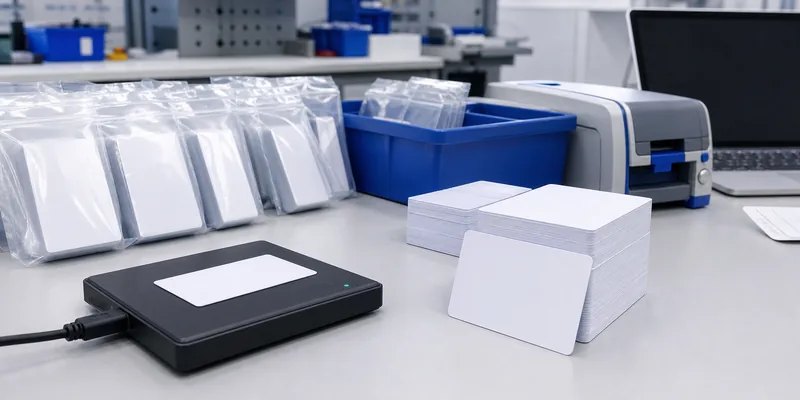
RFID card encoding and quality control for bulk blank card orders
Encoding and QC should verify data, reader response, packaging order, and print handling before delivery.

What to send WXR for a faster quote

To quote blank RFID cards accurately, WXR needs the project details that affect material, chip, printing, and encoding. A clear request should include the application, reader system, chip requirement, card size and thickness, printing method, artwork status, encoding needs, quantity, packaging preference, and sample deadline. If you are not sure which chip fits, share the reader model, existing card type, and target use case so the WXR team can suggest practical options.

For broader background, read what an RFID card is and the difference between NFC and RFID. When you are ready to compare samples, contact WXR with your card specification and testing requirements.

FAQ

Can blank RFID cards be printed with a desktop card printer?

Yes, but only if the card surface and printer are compatible. For inkjet printing, ask for inkjet-printable PVC card samples and test drying, smudging, edge coverage, and color before ordering in volume.

Should I choose LF, HF, NFC, or UHF for a blank RFID card?

Choose the frequency that matches the reader system. LF is often used for simple close-range ID, HF and NFC are common for smart cards and phone-related uses, and UHF needs project-specific testing because read behavior depends heavily on antenna setup and orientation.

Can WXR encode RFID cards before shipping?

WXR can support card encoding when the buyer provides the chip requirement and approved data format. Confirm which data should be written, locked, or left editable before production.

What is the main mistake buyers make with blank RFID cards?

The common mistake is approving the card design before confirming chip compatibility and encoding rules. A card can look correct and still fail if the chip, data format, or reader workflow is wrong.

What should I test before mass production?

Test the actual reader, software, printer, artwork, encoding file, card holder, and user workflow. If any of those change after sample approval, repeat the affected tests before ordering the full batch.

Schema recommendation: Article + FAQPage. The FAQ questions above are visible on the page and can support FAQPage schema if the SEO plugin allows it.

Understanding the Differences between IC Cards and RFID Cards

When it comes to access control and ID management, there are many different types of cards available. Two of the most popular are IC cards and RFID cards. It’s important to understand the differences between these two types of cards in order to make an informed decision about which one is best for your application. In this post, we’ll explain the basics about both IC cards and RFID cards so that you can make a more educated purchasing decision.

What is an IC Card?

An IC card (or integrated circuit card) is a type of smart card that contains an embedded microchip for storing data or performing specific functions. The chip stores memory and can also be used for authentication purposes. The amount of data stored on an IC card depends on the size of its embedded microchip, but it typically ranges from 8KB to 4GB.

The most common type of IC card is a contactless smart card, which uses radio frequency (RF) technology to communicate with a reader device without requiring physical contact. Contactless smart cards are often used in applications such as building access control, payment systems, public transportation ticketing, and identification management. They are also commonly used in point-of-sale machines or vending machines where customers need to quickly make payments without having to take out their wallet or purse.

What is an RFID Card?

An RFID card (or radio-frequency identification card) uses a tiny transponder installed inside a plastic card or key fob to transmit information wirelessly over short distances via radio waves. As long as the correct credentials are present, the transponder can activate a sensor or unlock a door lock within close range—typically around 10 cm (4 inches).

Unlike contactless smart cards, RFID cards do not require physical contact with readers or other devices in order to exchange data or perform tasks; they simply need to be close enough for their transponders to send signals back and forth between them and the reader device. This makes them ideal for applications such as inventory tracking, asset tracking, cashless payment systems, and more. They are also often used in corporate ID badges so that employees can gain quick access into secure areas without needing to swipe their badge through a reader each time they enter or exit the premises.

Conclusion:

When deciding which type of card is right for your application—an IC Card or an RFID Card—it’s important to consider factors like security requirements, proximity requirements (how far away will you be using your readers?), budget constraints and more before making your final decision.

Both types of cards have their own advantages and disadvantages depending on what you need them for; however understanding these differences may help you choose which option is best suited for your system integration needs. Hopefully this article has helped shed some light on why each type might be better than the other in certain scenarios so that you can make an informed decision when choosing between them!

What is RFID Card?

When you have a card with an RFID chip, it means that the card can transmit information wirelessly to a reader. This technology uses radio waves to communicate between the card and the reader, allowing for contactless applications.

But what does this mean for everyday usage? You may have encountered RFID technology in the form of tap-to-pay credit cards or key cards for hotel rooms. These cards make transactions and access control more convenient and efficient.

In this article, we’ll dive deeper into RFID technology, its uses and benefits, and potential security concerns. Read on:

What is RFID?

RFID stands for Radio Frequency Identification. It uses radio waves to communicate between a tag attached to an object and a reader device. This allows the transmission of information without physical contact or direct line of sight between the tag and the reader.

This technology has increasingly become more popular and widespread, particularly in retail and supply chain management. RFID tags contain information such as the item’s product number, manufacturer details, and price.

It is then used for various tasks such as inventory tracking and payment processing. RFID technology has also been used in many industries, including healthcare, transportation, and livestock management.

What is an RFID Card?

An RFID card is a type of RFID tag in the form of a card or badge that can be carried by a person. It usually contains information such as a unique identifier, making it useful for access control and identification purposes.

RFID cards have different components, including:

  • An RFID Chip. This is the smallest component of the tag. It is centrally located on the card and contains information that can be transmitted to the reader.
  • An RFID Antennae. This component is responsible for transmitting the information from the chip to the reader. It can either be a small coil or wire embedded within the card, or it can be around the edges of the card.
  • An RFID Substrate. This is the bulk material that holds the chip and antennae together, typically plastic printing cards. However, you can get NFC RFID wood cards, RFID paper ticket cards, JAVA CPU cards, or Epoxy RFID cards depending on the application and use case.

During the manufacturing process, the chip and antennae are embedded into the substrate material. This creates a durable and long-lasting RFID card that can withstand daily use. It is difficult to tamper with or damage the chip without causing visible damage to the card itself.

How do RFID Cards Work?

The card’s working rationale is similar to other RFID tags. They depend on the availability of a reader device to capture information.

The tag can be excited with electromagnetic waves from the reader, causing it to transmit its unique identifier or stored information. The reader captures this information and sends it to a computer for processing.

The process takes place without physical contact or direct line of sight, making it a convenient and efficient method for various applications. It is the best replacement for traditional barcode scanning, as RFID can hold more information and has a longer reading range.

Types of RFID Cards

RFID cards can be classified based on frequency and data storage capabilities.

Frequency

  • 125kHz LF RFID cards operate at 125 kHz or 134 kHz, making them suitable for short-range communication within a few inches. They are commonly used in access control systems, such as door entry badges.
  • 13.56MHz HF RFID cards have frequencies between 13.56 MHz and operate at a longer range of up to 3 feet. They can also contain more storage capacity, making them suitable for retail and supply chain management.
  • 860-960MHz UHF RFID cards have frequencies between 860 MHz to 960 MHz, operating at a longer range of up to 16 feet. They are commonly used in vehicle access and toll payment systems.

Additionally, you can have dual frequency RFID cards, giving you the leeway to use different frequencies, based on your needs and preferences.

Source of Power

The source of power for RFID cards affects their working range and durability. There are three types:

  • Passive Cards. These cards lack batteries and rely on the reader’s electromagnetic waves for power. They have a limited range and are more suitable for short-term or low-traffic applications. Their lack of battery makes them smaller and more durable.
  • Active Cards. These cards contain an internal battery, allowing them to transmit information at a longer range and for a longer duration. They are suitable for high-traffic and long-term use but require periodic battery replacement.
  • Semi-Passive (Battery Assisted Passive or BAP) Cards. These cards contain a battery to enhance their transmission range and duration but still rely on the reader’s electromagnetic waves for power. They offer a longer range and durability without the need for battery replacement.

Data Storage Capacity

The storage memory of RFID cards can range from a few bytes to several kilobytes. They can also have re-writeable or read-only capabilities. The storage capacity and re-writeability determine the card’s suitability for various applications.

For example, simple access control systems may only require a small amount of storage with read-only capability. On the other hand, retail and supply chain management may require a larger storage capacity with re-writeable capability to track item information.

If you require a card that you can delete and rewrite information on, opt for a re-writeable RFID card. This will enable you to update the card’s information as needed. For example, a membership or loyalty card with re-writeable capability can have its points balance updated each time it is used.

Material Used

Cards can also be classified based on the material used for their construction. Here are common materials used for RFID cards:

  • Plastic or PVC. These are the most common and affordable options, making them suitable for a wide range of applications. They can also be easily imprinted for branding and visual identification. This way, they can serve a dual purpose as both a functional RFID card and a branded membership or loyalty card.
  • Polyester or PET. These cards are more durable and resistant to bending and breaking, making them suitable for long-term use in harsh environments. They also have a smaller form factor, allowing for easier carrying.
  • Wooden RFID Cards. These cards have a unique and eco-friendly appearance, making them suitable for certain branding or marketing campaigns. They are also durable and suitable for long-term use. You can customize them to add unique finishes or engravings.
  • Epoxy RFID Cards. These cards have a glossy finish and can be customized with full-color graphics, making them suitable for branding. They are also durable and resistant to wear and tear. Its hardy construction also allows for use with chemicals, temperature, and water. They are best suited for industrial and harsh environments.

Uses of RFID Cards

RFID cards can be used for a wide range of applications, including but not limited to:

  • Access Control. High-security areas can use RFID cards for restricted entry. This can include offices, warehouses, and buildings. Authorized individuals are issued RFID cards containing their unique identification, allowing them to easily access restricted areas.
  • Attendance Tracking. RFID cards can be used for attendance tracking in schools and businesses. This allows for more efficient and accurate record-keeping compared to traditional sign-in sheets.
  • Transportation Systems. RFID cards can be used as fare cards for public transportation systems, such as bus or train systems. They can also be used in toll payment systems for cars. This allows for a convenient and efficient payment system without the need to stop and physically pay at each toll booth.
  • Customer Loyalty Programs. Retail stores can use RFID cards for loyalty programs, where customers can earn and accumulate points with each purchase. These RFID cards can also be used as payment methods at the store.

Generally, RFID cards provide a convenient way to store and access information, making them suitable for various industries and applications. They are affordable and easy to use, ensuring seamless integration into existing systems.

Choosing the Best RFID Tags for Your Needs

Selecting the right RFID card will depend on your specific needs and requirements. Consider factors such as:

  • Read/Write Capabilities. If you make the mistake to buy one-time use RFID card, you will not be able to update the information stored on it. Consider opting for a re-writeable option if updating information is necessary.
  • Materials Used. The material used can impact the card’s durability and suitability for certain environments. Choose a material that can withstand wear and tear and meet any special requirements, such as resistance to chemicals or temperatures.
  • Customization Options. If you want a tag that can be personalized with your branding or graphics, look for options that offer full-color printing and special finishes. This way, the RFID card can serve as both a functional tool and a marketing tool.
  • Read Distance. The read distance refers to how far away an RFID reader can scan and still accurately detect the card’s information. Consider the necessary range for your specific application. For example, tracking stationary assets may require active RFID tags with longer read distances, while access control may only require a shorter read distance.

Overall, carefully evaluating your needs and requirements will help you choose the best RFID card for your specific application. Ensure that the card meets all necessary specifications and can withstand any potential challenges in its environment.

Ask For A Quick Quote

Your inquiry will be replied within 24 hours! Please pay attention to the email with the suffix “@tag-rfid.com”. If not received, please check your spam email.